Newsletters
Your newsletter reads the sign-up sheet. It doesn't copy it.
Build the monthly PTO newsletter in Roost: your colors, your photos, real sections. When you add a volunteer list, Roost counts how many spots are actually left at the moment the email goes out.


A newsletter is wrong before it's read.
You write it Sunday night. “We still need 12 people for the carnival.” It goes out Tuesday morning. Four people signed up in between.
Now the email is wrong. Families either think the need is bigger than it is, or they learn not to trust the numbers in your emails. Every PTO lives with this. Almost nobody thinks of it as something that could be fixed.
The count comes from the sign-up sheet.
Point a volunteer section at an event or a club. Roost lists the jobs with the real number beside each one, and hides the ones that are already full.
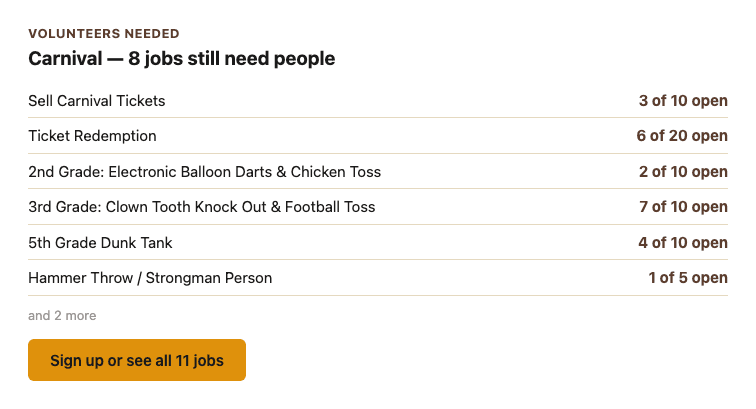
Those numbers are counted the moment the email goes out, not when you typed them. Write the draft on Sunday, send it Tuesday, and Tuesday's families get Tuesday's numbers. Show the first six and Roost writes “sign up, or see all 11 jobs”, so nobody thinks the short list is the whole list.
The sixty-second version
Build a newsletter with a volunteer section. It says 6 of 20 spots open. Have someone sign up for a shift. Refresh the preview. It says 5 of 20. Nobody edited the newsletter.
An email can't change once it's in somebody's inbox, in any product. What Roost does is count at the moment of sending rather than the moment of writing. And the copy families open inside Roost keeps counting: open that newsletter a week later and the numbers are today's.
Fill it in once, in one place.
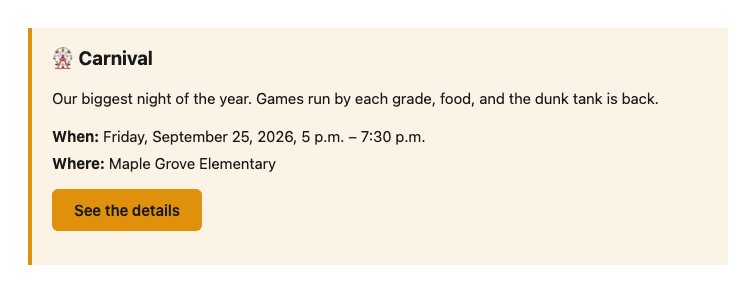
Pick an event that's already on your Roost calendar and the block writes in the name, date, time and location. Move the start time in Roost and you don't have to remember you also typed it into a newsletter.
Your contact card carries your address, phone, website and social links, all from your organization record. Nobody types it, so it can't go stale.
It's a real editor.
Everything below is table stakes. It's here because the part above doesn't matter without it.
- Start from a shape.
- Monthly newsletter, call for volunteers, event announcement, short update, blank, or the welcome newsletter, already written, for your first send.
- Thirteen block types.
- Header band, big opening, section headings, text, picture beside text, picture, callout, button, divider, plus the four that read from Roost.
- Your colors.
- Pulled from your brand settings. Roost measures the contrast and picks the text color, so a header can't come out unreadable.
- See it as families will.
- The preview is built by the same code that builds the real email.
- Drafts.
- Save one half-finished and come back to it.
- Send it to your president for review.
- A link they can open without a Roost account. They see the email and nothing else: not the audience, not the recipient count, and no way to send it. Expires in 14 days, and you can revoke it.
- Your own templates.
- Save a layout you like and start there every month.
- Photos from anywhere.
- Canva included. Alt text is required.
- Still counting after it sends.
- Families who open the newsletter inside Roost see the numbers as they stand that day, not as they stood when it went out. The copy in their email inbox is a snapshot, because every email is.
In Roost this lives under Broadcasts, which is where all your PTO's email goes out from. A newsletter is one kind of broadcast.
What we don't tell you.
No open tracking.
We don't tell you who opened your newsletter.
No per-person click tracking.
You see a total count per link, enough to know the sign-up link is working. Never which family clicked it.
Read state belongs to the person who got the email.
Not to you.
You never see member email addresses.
Broadcasts go BCC.
Unsubscribing doesn't remove anyone from the directory.
In a mailing-list tool, unsubscribe means gone. In Roost it only silences future broadcasts. The family stays in the directory, still visible to their child's class, still able to sign up for things. If someone on your board argues against emailing families because you'll lose them, this is the answer.
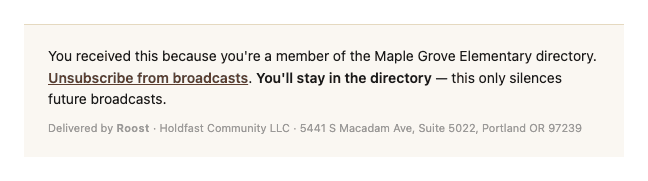
You'll know whether the sign-up link is working. You'll never know whether Amanda read it. That's on purpose.
This doesn't replace your district's system.
Your district has a system for official announcements, and your PTO can't switch it off. That's not what this is. The school has a megaphone; this is the PTO's: different sender, different list, different job.
What it does replace is the separate email tool. If you're paying for a directory and paying again for a mailing list that someone has to keep current by hand, you're paying twice for one list. In Roost the list is the directory.
Keep using Canva for the artwork. Drop the image in. Let Roost carry the parts that change.
Your first one is already written.
New to Roost? The welcome newsletter is built: change the names, pick your event, and send it. It's the email that gets families logged in, which is the only thing that makes a directory work.
Newsletters are part of Broadcasts, included in the Community plan. See pricing.